Turn your trip's photos into a keepsake movie
Memowheel is a free Windows app that gathers a trip's photos and short clips, groups them by place and day, and renders a movie with title cards, captions, and music — all on your own computer.
Download for Windows Free · about 195 MB · Windows 10 or 11What it does
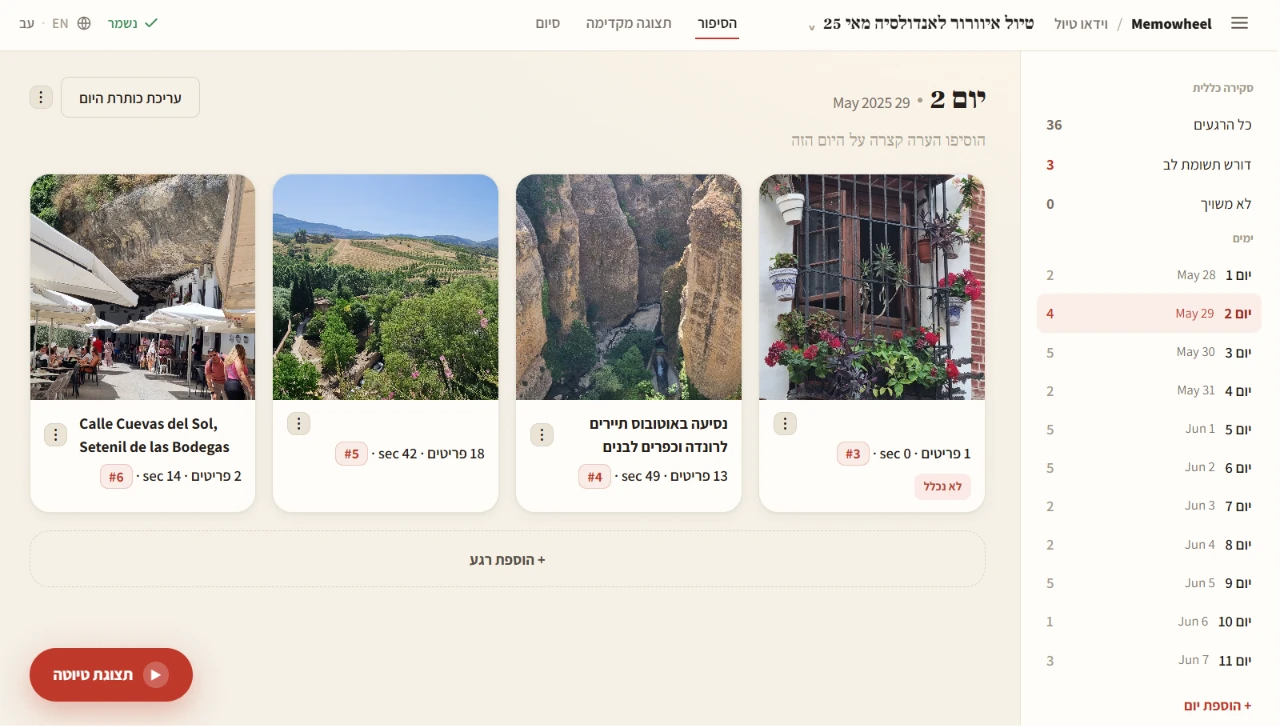
Point Memowheel at a folder of trip photos and clips. It sorts them into moments — by place and by day — and opens a friendly review page in your browser where you keep the good ones, fix names and places, choose music, and set title cards. When you're happy, it renders a finished MP4 you can keep or share. There's no learning curve and no editing skills required.
Grouped automatically
Photos and clips are clustered into moments by place and day, so the story is half-built before you start.
Review in your browser
Curate, reorder with drag-and-drop, correct places and people, and pick a soundtrack — all in a calm, simple workspace.
Title cards & captions
An opening title, per-day cards, and place captions are added for you, and stay fully editable.
On-device face recognition
Recognize the people you care about across the trip. Faces are processed on your machine and never uploaded.
Places from GPS — offline
Photo GPS tags become place names without any internet or API. You can also type places by hand.
Bilingual by design
The app and the finished video work in both Hebrew (right-to-left) and English.
Your photos stay yours
Memowheel runs entirely on your own computer.
- No account, no sign-up, nothing to log into.
- Face recognition happens on your machine — faces are never uploaded.
- The only thing that ever leaves your computer is a photo you explicitly approve for optional AI place-naming (using your own API key). You can skip that entirely and type places yourself.
What you need
- Windows 10 or 11, 64-bit.
- About 430 MB of disk for the app, plus room for your media.
- 4 GB RAM minimum; 8 GB+ for smooth 1080p renders.
- No Python, no ffmpeg, no installer — just unzip and double-click.
Ready to make yours?
Download the app, then follow the short install guide. You'll be reviewing your first trip in minutes.
Download for Windows Free · about 195 MB · Windows 10 or 11